


It is Friday afternoon, and someone on your team is still doing it. Five tabs open, a half-filled spreadsheet, and a client email sitting in drafts waiting for the numbers. This happens every week, and nobody calls it a problem because it has always been this way.
It’s more of a reporting problem than a systems problem. Reporting automation fixes it at the source, and when the right workflow is in place, that report goes out on its own, every time, without anyone touching it.
What Is Reporting Automation and What Does It Actually Cost You to Skip It?
Reporting automation is a system that connects your data sources, pulls the numbers on a schedule, formats them into a report or dashboard, and delivers it to whoever needs it, without manual input at any step. It replaces the cycle of logging into platforms, exporting CSVs, copying numbers into slides or spreadsheets, and emailing documents by hand.
The cost of doing this manually is higher than most teams realize. Data analysts spend 80% of their time finding, cleaning, and organizing data, leaving only 20% to actually perform analysis. That ratio does not get better just because the team gets bigger. It stays broken until the process changes.
For agencies specifically, the numbers are more concrete. Manual reporting takes 5 to 10 hours per client per month. For a 15-client agency, that is up to 180 hours a month spent on report assembly, not strategy, not execution, not growth. That is more than a full-time employee's working hours spent on something a workflow can handle in minutes. Automated reporting does not just save time but removes a category of work entirely.
What Types of Reporting Can You Automate?
This is where most businesses are surprised by how wide the scope actually is. Automated reporting is not limited to one department or one tool. It covers every repeating report your business produces, regardless of where the data lives, including seo reports, financial reports, marketing reports, Google reports, and reports for clients as well.
1. Automated SEO Reports and SEO Automated Reporting
Automated SEO reports pull data from Google Search Console, rank trackers, and backlink monitors and compile them into a formatted, scheduled document without anyone logging in to pull the numbers. SEO automated reporting means your keyword rankings, traffic trends, technical site health, and backlink movement all update on their own and land in the client's inbox or your team's dashboard on the day you set.
The reason this matters is consistency. A manual SEO report is only as good as the person who had time to build it that week. An automated SEO report is identical in quality whether the team is at full capacity or running flat out during a pitch cycle.
2. Financial Reporting Automation
Financial reporting automation connects directly to your accounting system, whether that is QuickBooks, Xero, or something else, and pulls your P&L, cash flow statement, and budget versus actuals into a formatted report on whatever cadence your finance team or leadership needs. The numbers update when the source updates. Nobody is reconciling figures manually the night before a board meeting.
This is one of the highest-stakes reporting types to automate because errors in financial reports have real downstream consequences. Manual data entry introduces risk at every step. Automation removes that risk at the source.
3. Automated Marketing Reports
Automated marketing reports consolidate campaign performance across every channel your team runs, paid search, social ads, email, and organic, into one report that updates on its own schedule. The alternative is someone exporting data from five platforms and trying to make the date ranges line up every single time.
End-to-end marketing data integration is what makes this work. When your ad platforms, your CRM, your email tool, and your analytics platform are all connected to the same reporting layer, the report reflects reality instead of reflecting whatever someone managed to pull before the deadline.
4. Google Analytics Automated Reports
Google Analytics automated reports are one of the most common starting points for businesses new to automated reporting. Google's own Looker Studio connects natively to GA4 and lets you build a dashboard that updates in real time without anyone logging in and exporting data. Traffic, behavior, goal completions, and landing page performance all update automatically and can be shared with stakeholders as a live link instead of a PDF attachment.
5. Automated Reporting for Clients
Automated reporting for clients is where agencies get the clearest return. A white-labeled, branded report that delivers itself to the client on a set schedule does two things at once. It saves the account manager hours of assembly time, and it makes the agency look more professional and consistent than one where reports arrive whenever someone remembers to send them.
Automated client reporting for agencies also scales in a way that manual reporting never can. Adding a new client to an automated system takes minutes. Adding a new client to a manual reporting process adds hours to someone's workload every single month.
What Does an Automated Reporting Workflow Actually Look Like?
The first setup takes time, then every report after that takes zero. You connect your sources, build the template once, set a schedule, and the system pulls the data, formats the report, and delivers it automatically every time.
Here is a real example of how automated reporting runs once it is set up properly:
- Your data sources, such as Google Analytics, your ad platforms, your CRM, and your accounting tool connect to a central reporting layer.
- You build a report or dashboard template once, with the metrics that matter for that specific audience.
- You set a schedule: weekly, monthly, or whenever the data refreshes.
- The system pulls fresh data from every connected source on that schedule.
- The report formats automatically using your template.
- It delivers itself to the client, your team, or your leadership via email or a live dashboard link.
What Are the Best Automated Reporting Tools Right Now?
The right tool depends on what you are reporting on and who the audience is. Looker Studio works for basic Google Analytics automated reports. DashThis and AgencyAnalytics are built for agencies, and Power BI handles financial reporting automation for teams that need more depth.
Here is an honest breakdown of the most used options:
- Looker Studio is Google's free reporting tool. It connects natively to GA4, Google Ads, and Search Console, making it the obvious starting point for Google Analytics automated reports and basic automated marketing reports. It is free and flexible but gets clunky when you try to pull in data from outside the Google ecosystem.
- DashThis specializes in automated reporting for clients and automated marketing reports. It connects to 34-plus marketing platforms and is built specifically for agencies that need clean, branded, scheduled reports. Setup is fast, white-labeling is straightforward, and it is purpose-built for recurring client delivery.
- AgencyAnalytics is built for agencies managing SEO and marketing reporting at scale. It handles automated SEO reports, SEO automated reporting, rank tracking, and multi-channel marketing dashboards in one place. It is purpose-built for automated client reporting for agencies and scales well as the client list grows.
- Microsoft Power BI handles financial reporting automation and broader business intelligence better than most. It is the strongest fit for businesses already running on Microsoft's stack and for teams that need to combine operational and financial data in one place. It is more complex to set up but significantly more powerful for enterprise-level reporting needs.
One honest note: off-the-shelf tools work well for standard reporting setups. When your data lives across custom systems, when reports need to combine operational and financial data in non-standard ways, or when the workflow needs to connect across departments, an off-the-shelf tool usually hits a ceiling. That is where a custom-built automation workflow handles what packaged software cannot.
What Is Agentic AI for Operational Reporting and Why Does It Matter?
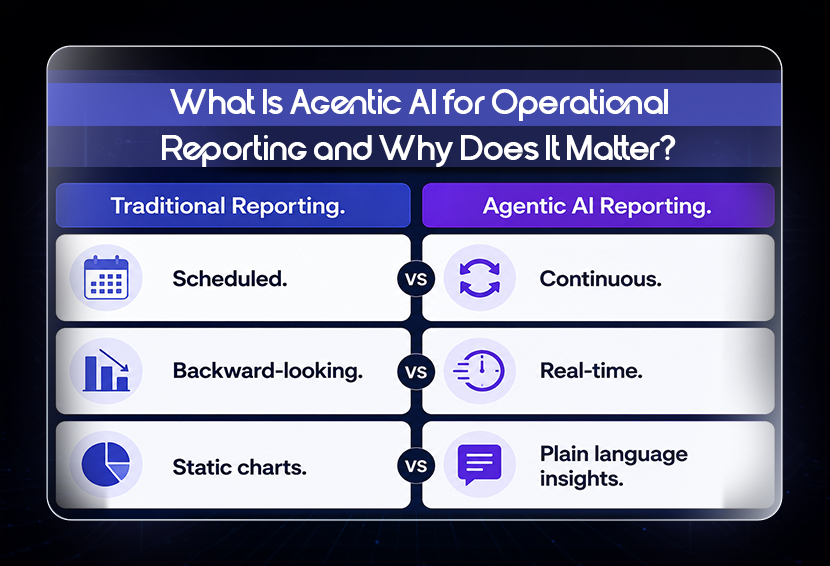
Traditional automated reporting is scheduled and backward-looking. It tells you what happened last week or last month. Agentic AI for operational reporting is different in a meaningful way. Instead of waiting for the next scheduled report, agentic AI monitors your data continuously. It detects anomalies, flags drops or spikes, and surfaces insights in real time without anyone asking it to. According to Gartner's 2025 Data and Analytics Summit, agentic analytics is now identified as a top trend, with AI agents automating closed-loop business outcomes and delivering insights in plain language rather than static charts.
Real-time business performance dashboards are the practical output of this shift. Rather than opening a dashboard manually to check performance, agentic systems push relevant updates to your team when something actually needs attention. A campaign that drops below the threshold triggers an alert. A revenue figure that deviates from the forecast triggers a notification. The system works while your team is focused on something else.
For most SMBs and growing agencies, fully agentic reporting is the next step after getting solid automated reporting foundations in place. The infrastructure has to exist before the intelligence layer adds value on top of it.
Conclusion
When reporting automation is working properly, Friday afternoon looks completely different. The report has already gone out. The dashboard is already updated. The client already has their numbers. The only thing left for your team to do is decide what to do with the information. That is what the work was supposed to be about in the first place.
If you want to understand what building these systems actually looks like in practice, SPCTEK AI's automation workflows cover how custom-built reporting workflows are structured for businesses that have outgrown what off-the-shelf tools can handle. And if you want to know which of your current processes would benefit most from automation before you build anything, a structured business process audit is the fastest way to find out.
FAQs
Q: How do I automate weekly reports for my business?
Start by identifying the data sources your weekly report pulls from. Connect them to a reporting tool like Looker Studio, DashThis, or AgencyAnalytics, depending on your reporting type. Build your template once, set a weekly delivery schedule, and the system handles the rest. For reports that cross multiple departments or pull from custom data sources, a custom-built workflow will be more reliable than an off-the-shelf tool.
Q: What is automated client reporting for agencies?
Automated client reporting for agencies is a system that pulls performance data from all relevant platforms, formats it into a branded, professional report, and delivers it to the client on a set schedule without the account manager assembling it manually. It covers automated SEO reports, automated marketing reports, and any other recurring deliverable the agency sends. The benefit is twofold: hours saved per client per month and consistent delivery that builds client confidence.
Q: What is end-to-end marketing data integration?
End-to-end marketing data integration means all your marketing platforms, your ad accounts, your email tool, your CRM, and your analytics platform are connected to a single reporting layer. Data flows from each source into your reports automatically, with no manual exports or copy-paste steps in between. This is what makes automated marketing reports actually accurate, because the data comes directly from the source on a live connection rather than from a CSV someone exported two days ago.
Weekly Newsletter
Scale Without Operational Chaos
Get weekly actionable insights and AI updates to improve operations and grow with better systems.
2,400+ operators subscribed
Unsubscribe anytime