

Right now, someone at a competing business is not manually sorting through invoices. They are not spending three hours pulling together a weekly report. They are not chasing follow-up emails one by one. A system is doing all of that while its team works on something that actually needs a human brain.
AI adoption has moved rapidly into the mainstream. McKinsey's 2025 global survey found that 88% of respondents said their organizations were regularly using AI in at least one business function. If your business is still running on the same manual workflows it had two years ago, you are not behind on a trend. You are behind on something that is actively changing how businesses compete. AI-driven digital transformation is not a future event. It is happening in operations right now, and this guide will show you exactly what that looks like.
What Does AI-Driven Digital Transformation Actually Mean in 2026?
AI-driven digital transformation is not about replacing your entire tech stack or hiring a team of data scientists. It means AI is no longer a separate tool you open in a new tab. It is built into the tools you already use, working in the background while you get on with the rest of your day.
Your CRM now generates customer insights without anyone pulling a report. Your project management tool flags a deadline risk before anyone notices. Your finance software catches a duplicate payment before it goes through. That is what transformation looks like in practice. Quiet, embedded, and useful.
Here is the honest part, though. 85% of companies claim they are ahead of their competitors in digital transformation. But 89% of those same companies admit their tech investments have not fully delivered the results they were expecting. That gap between buying AI tools and actually getting value from them is real. The businesses closing that gap are the ones that started with specific processes, not a big vision.
How AI is Changing Day-to-Day Business Operations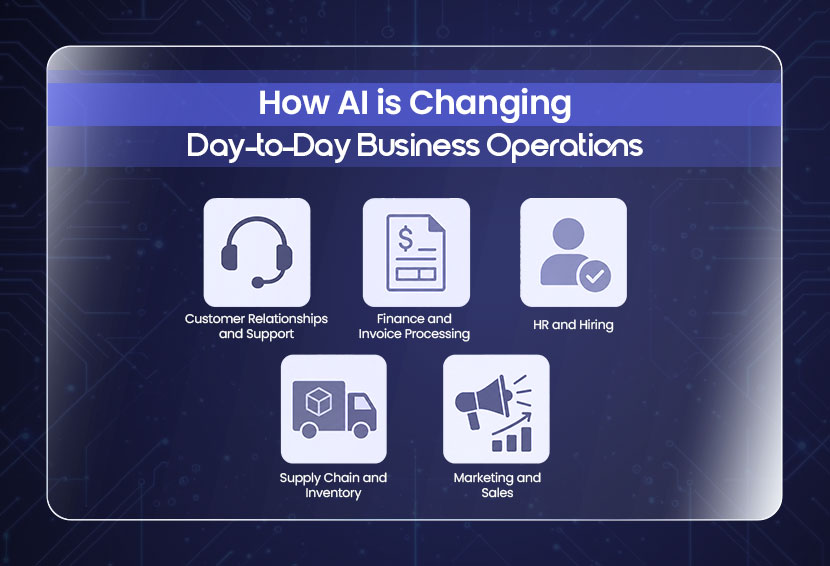
Artificial intelligence business applications are not all running in Fortune 500 boardrooms. They are in customer service queues, HR departments, finance teams, and warehouse systems right now. Here is where the biggest shifts are happening.
1. Customer Relationships and Support
AI handles between 60% - 80% of routine customer queries in retail and service businesses today. That is not just saving time. It means your human support team is free to handle the complex cases that actually need empathy and judgment.
If you have wondered whether AI tools can help you manage customer relationships more effectively, the short answer is yes. AI tracks buying patterns, flags at-risk accounts, sends follow-ups at the right time, and surfaces insights your team would never have the bandwidth to find manually. Businesses using AI in customer support report saving up to $8 billion a year across the industry. For a smaller business, even automating the basic response queue makes a real difference.
2. Finance and Invoice Processing
Chasing unpaid invoices, reconciling accounts, catching duplicate entries. This is the kind of work that eats hours and produces zero growth. AI handles all of it. Automated reconciliation, payment reminders, anomaly detection, and cash flow forecasting are all standard features in modern finance tools now. The human accountant focuses on decisions, not data entry.
3. HR and Hiring
Unilever reported saving around 100,000 hours of interviewing time annually through AI-assisted recruitment. That number sounds large, but the process is simple. AI screens applications, schedules interviews, sends onboarding documents, and tracks completion. People still make the final call. AI just removes the administrative weight around every decision.
4. Supply Chain and Inventory
AI tracks inventory in real time, predicts when stock will run low, and places reorders before a shortage happens. For businesses managing physical products, this one change alone cuts both overstock costs and lost sales from running out. It also flags supply chain disruptions early, so you can reroute before a problem becomes a crisis.
5. Marketing and Sales
AI scores leads based on behaviour, automates outreach sequences, personalises content by segment, and tells you which campaigns are actually driving revenue. Your sales team reaches out to the right people at the right time instead of working through a flat list.
If you want to go deeper into which processes to tackle first, the upcoming blog, Top 10 Business Processes You Should Automate First, will walk you through exactly that.
What Is Intelligent Automation and Why Does it Matter Now?
Basic automation follows rules. If this happens, do that. It works well for simple, predictable tasks. But most business processes are not simple. They involve exceptions, judgments, and data from multiple systems.
Intelligent automation is what you get when you combine AI with RPA (robotic process automation) and machine learning. The system does not just follow rules. It reads context, handles exceptions, learns from patterns, and improves over time. It is the difference between a bot that processes standard invoices and one that also flags the unusual ones, routes them to the right person, and logs why they were flagged.
This combination is what people mean when they say hyperautomation. It is not one tool. It is the layering of AI, automation, and data working together across a workflow.
The best AI automation tools for getting started here are platforms like
- n8n
- Microsoft Power Automate
- UiPath
- Make
Each one connects your existing tools and lets you build automated workflows without writing code from scratch. SPCTEK.AI has a library of practical workflow automations for SMBs and marketing agencies, including complex system automation and ready-to-use templates.
Also Read: What is Business Process Automation: A Complete Beginner's Guide
Agentic AI: The Biggest Shift in Business Operations
Most of what people call AI today still waits for instructions. You type something, and it responds. You upload a file, and it processes it. Agentic AI for business operations works differently. It sets its own goals, breaks them into steps, takes action across multiple tools and systems, and adjusts based on what happens. No one needs to be in the loop for each step.
A real example. An AI agent monitors your CRM, identifies a high-intent lead based on website behaviour and email engagement, sends a personalised outreach email, follows up three days later if there is no reply, and books a demo when the prospect responds. The sales rep gets a notification that a meeting is booked. That is it. No manual steps in between. Gartner predicts that up to 40% of enterprise applications will include integrated task-specific AI agents in 2026, up from less than 5% in 2025. That is up from less than 5% just a year ago.
Can AI Agents Work Without Supervision?
Yes, and many already do. But the best deployments do not treat this as all-or-nothing. A low-risk, high-volume task like routing a support ticket or sending a status update runs fully automatically. A higher-stakes decision like approving a vendor contract above a set amount still requires a human sign-off. You define the thresholds, while the AI operates within them. That calibrated approach is what gives operations leaders the confidence to actually deploy these systems rather than just run pilots forever.
Humans and AI: The Hybrid Workforce Model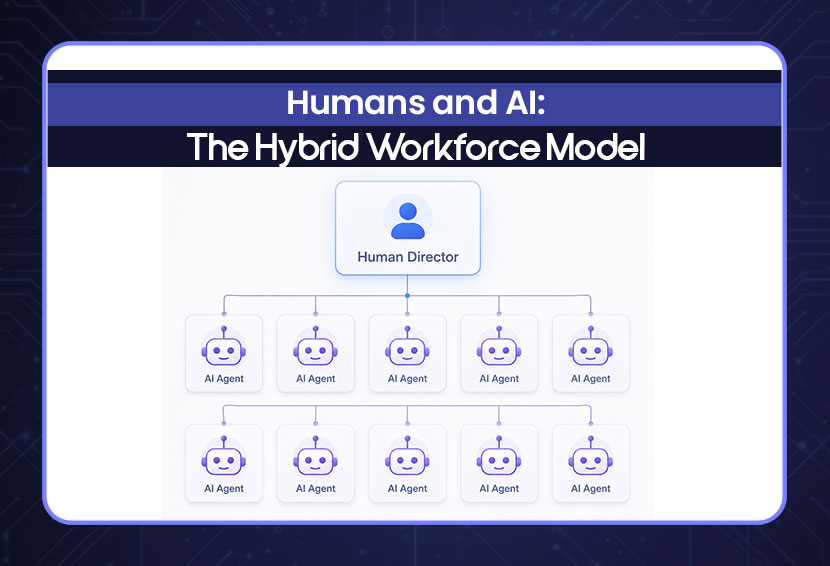
The loudest conversation around AI in 2026 is still about job replacement. That is mostly the wrong conversation. The businesses actually getting results are not replacing teams with AI. They are running hybrid workforces where AI handles volume and humans handle judgment.
Hybrid talent AI integration is what this looks like in practice. Predictions point to the rise of role-based AI agents that work alongside human employees as part of the same operational team. Think of it as one human director overseeing ten AI workers, each handling a defined part of a workflow. The human sets priorities, reviews exceptions, and makes the calls that require context only a person can have.
According to research cited by UC Today, 57% of business leaders expect AI investment to increase headcount, not reduce it. This suggests that some organizations expect AI to change the composition of work rather than simply reduce staffing. You still need people, but you just need them to do different things.
What should you consider when integrating AI into your business? Start by understanding what your people actually spend time on. Not what the job description says, but what a typical Tuesday actually looks like. That is where the automation opportunity lives.
Before you pick a tool, audit your processes. Our blog How to Perform a Complete Business Audit in One Afternoon is a good place to start.
Which Industries Are Leading in AI Adoption?
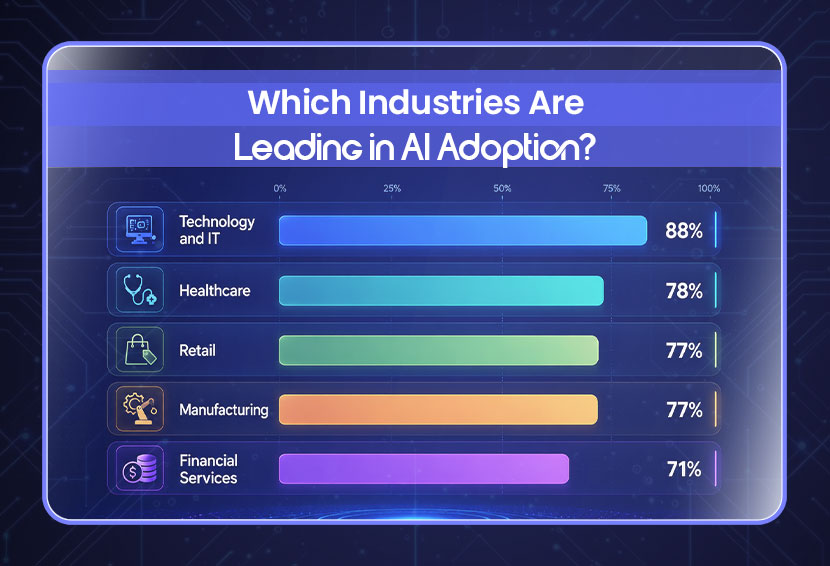
AI workflow tools have spread across almost every sector, but some industries are years ahead of others. Technology and IT lead at 88%, followed by retail at 80% and financial services at 71%. Healthcare is growing fastest at a 36.8% CAGR, and manufacturing is cutting costs by 25% through predictive maintenance alone.
- AI workflow tools: These have spread across almost every sector, but adoption is not even. Some industries are years ahead. Others are just getting started. Here is where things stand.
- Technology and IT: This industry leads at 88% adoption, according to McKinsey. It is the industry that builds AI, so it is not surprising that it also uses it the most.
- Financial services: They sit at 71% adoption. Banks and insurers use AI heavily for fraud detection, credit risk assessment, compliance monitoring, and automated trading. It is one of the highest-ROI sectors for AI investment.
- Healthcare: This industry has the fastest growth rate at 36.8%. AI reads medical imaging, supports clinical decisions, and handles the documentation load that was burning out clinical staff.
- Retail: Adoption is estimated at 80%, based on IBM's 2025 study. AI-driven personalisation, demand forecasting, and dynamic pricing are now standard tools for any retailer competing online.
- Manufacturing: It uses AI mainly for predictive maintenance. Research cited by ATS indicates that predictive maintenance can reduce maintenance costs by approximately 25% and downtime by up to 70%.
Construction and hospitality are still catching up. If your business is in one of those sectors, the window to get ahead is still wide open.
How Much Does Enterprise AI Cost in 2026?
This is the question most AI content avoids answering directly. Here are the numbers.
Off-the-shelf AI and automation: Pricing can start at relatively low per-user, per-bot, or usage-based rates. For example, Microsoft's Power Automate starts at $15 per user per month, while Copilot Studio offers capacity-based pricing.
Custom AI implementation:Clutch's 2026 pricing data shows AI projects commonly ranging from $10,000–$49,999, with an overall average project cost of approximately $120,595 based on verified client reviews.
Complex enterprise deployments: Costs can rise substantially beyond typical project ranges when implementations require multiple systems, custom models, proprietary data pipelines, enterprise security, governance, and long-term maintenance. Clutch's project data includes AI engagements in the $200,000–$999,999 bracket and even higher.
Those numbers can feel large. But the better question is what it costs to not automate. Well-designed automation can reduce operating costs by lowering manual processing time, errors, and repetitive workload. Poor data quality alone costs businesses trillions in errors, rework, and missed decisions every year.
Can AI-driven solutions reduce operational costs? Yes, consistently. But only when they are applied to the right processes with clear measurement in place. The cost of the tool matters less than whether you can actually track what it saves you.
How to Use AI to Automate Your Business?
Most businesses that struggle with AI adoption try to do too much at once. They build a business case for automating five departments simultaneously and end up with a six-month implementation that delivers nothing in the meantime.
Start with your most repetitive tasks, not your biggest problems. Data entry, email follow-ups, and invoice matching are more feasible to start with. Pick one department, prove it works, then expand. Use tools that connect to what you already have, and measure time saved before you move to the next process.
- Step 1: Find your most repetitive tasks: Not the biggest problems. The most repetitive ones. Data entry, report generation, email follow-ups, and invoice matching. These are the processes where automation pays off fastest.
- Step 2: Pick one department: Finance, HR, or customer support. Wherever the highest volume of manual, rule-based work is happening. Prove it works there before expanding.
- Step 3: Choose tools that connect to what you already use: The best AI workflow tools are the ones that plug into your existing CRM, inbox, or finance system. You do not need to replace your stack. You need to connect it.
- Step 4: Measure before you expand: Time saved, error rate before and after, team hours freed up. If you cannot measure it, you cannot justify the next phase.
Our business process automation guide gives you the full framework.
What Are the Latest Trends in AI-Powered Digital Transformation?
AI-driven digital transformation is moving fast, but a few directions are clearly pulling ahead. AI now runs inside the tools you already use, not as a separate app. Networks of agents handle full workflows together, passing tasks automatically while businesses map their processes first before automating anything. Privacy-sensitive work stays local with edge AI, and governance frameworks are being built in from the start as agents take on more decisions.
- AI is becoming invisible infrastructure: It is no longer a standalone tool. It lives inside your CRM, your inbox, your project management platform. You interact with your normal tools, and AI runs underneath them.
- Multi-agent systems are gaining ground: Instead of one AI handling one task, networks of agents handle connected workflows together. One agent qualifies the lead, another writes the email, another books the meeting, and the handoffs are automatic.
- Process mining is coming before automation: More businesses are using AI to map and analyse their existing processes before automating anything. You cannot automate what you have not understood. This step alone saves months of failed implementation.
- Edge AI is growing for privacy-sensitive work: Processing data locally on devices instead of in the cloud means faster response and better data protection. This matters especially for healthcare and finance.
- Governance and cybersecurity are no longer optional: As AI agents take on more autonomous actions, the question of who is responsible for mistakes becomes urgent. Businesses are now building governance frameworks before they deploy, not after.
Conclusion
Most businesses are somewhere in the middle of this shift. They have tried a few tools, automated one or two things, and are not quite sure what to do next. That is a normal place to be.
The businesses that are pulling ahead are not the ones with the biggest budgets. They are the ones who picked one process, automated it, measured what changed, and then moved to the next one. That compounding effect is where AI-driven digital transformation actually comes from.
FAQs
Q: Is AI automation only for large businesses?
Not at all. Many AI tools today start free or cost under $100 a month, and small businesses are often faster at adopting them because they have fewer legacy systems to work around.
Q: How long does it take to see results from AI automation?
Most businesses see measurable results within 30 to 90 days of automating their first process. The simpler and more repetitive the task, the faster the payoff shows up.
Q: Do I need a technical team to implement AI in my business?
Not for most tools. Platforms like Zapier, Make, and Power Automate are built for non-technical users. You need someone who understands your processes well, not necessarily someone who can write code.
Q: What is the difference between AI automation and traditional automation?
Traditional automation primarily follows predefined rules and requires explicit logic for exceptions. AI-based automation can help process less-structured inputs and support more flexible decision-making.
Q: Will my team need retraining when we bring in AI tools?
Some, yes. But most modern AI tools are designed to fit into existing workflows, so the learning curve is minimal. The bigger shift is getting your team comfortable with letting the tool handle tasks they used to do manually.
Q: What happens when an AI tool makes a mistake?
AI tools make mistakes, especially early on. That is why you measure results from day one and build in checkpoints for high-stakes tasks. Error rates should be monitored continuously, and recurring failures should trigger changes to prompts, rules, models, data, or workflow design.
Q: Can AI tools help in managing customer relationships more effectively?
Yes, AI handles the repetitive stuff, follow-ups, ticket routing, and data crunching. So, your team can focus on actual relationship-building. It also spots patterns in customer behavior that humans tend to miss, which means fewer surprises and faster responses.
Q: What should I consider when integrating AI into my business?
Start with a specific problem, not the technology. Make sure your data is clean, your team is on board, and the costs actually justify the return. Don't overlook compliance; how the tool handles customer data matters, especially in regulated industries.
Weekly Newsletter
Scale Without Operational Chaos
Get weekly actionable insights and AI updates to improve operations and grow with better systems.
2,400+ operators subscribed
Unsubscribe anytime