


Most businesses guess at automation ROI instead of calculating it. A tool gets bought because it feels like the right move, or it gets cancelled six months later because nobody can prove it worked. Both outcomes come from the same problem. Nobody ran the numbers before or after.
This blog gives you the actual formula for the ROI of automation, a worked example you can copy with your own numbers, and the specific mistakes that make most ROI calculations wrong before they even start.
What Is the ROI of Automation and Why Does It Matter?
ROI stands for return on investment. For automation, it means a specific percentage that tells you how much value you got back compared to what you spent. Not a feeling. Not "it seems faster now." An actual number.
This matters because automation decisions get made on hope more often than they should. A team buys a tool because a vendor showed a slick demo. A manager approves a project because a competitor is doing it. Without a real ROI number, you cannot tell the difference between automation that paid for itself in two months and automation that quietly drains money every quarter.
If you are still deciding what automation even means for your business, this guide breaks down the basics before you get into the math. Calculating the ROI of automation turns a guess into a decision you can defend, repeat, and improve.
How Do You Calculate the ROI of Automation?
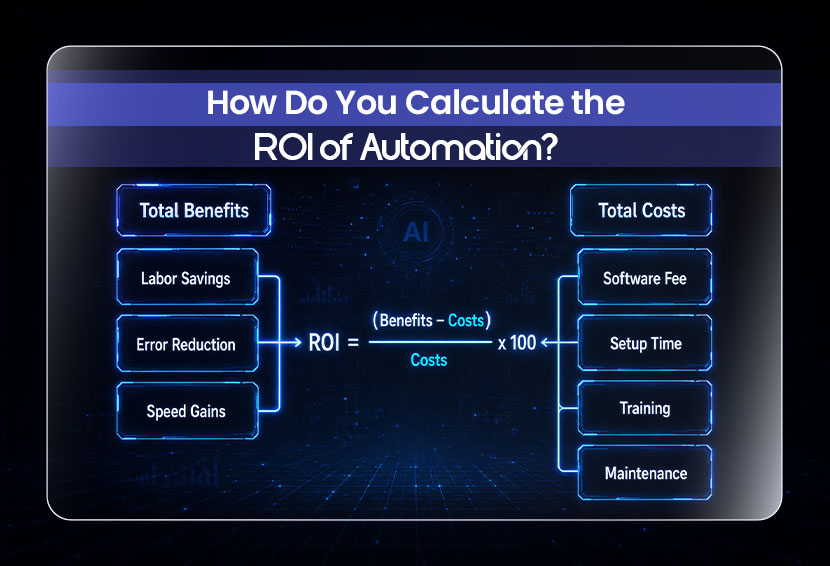
The formula stays the same no matter what you are automating.
ROI = ((Total Benefits − Total Costs) / Total Costs) x 100
Total benefits usually come from three places:
- Labor savings: The hours your team no longer spends on the task, multiplied by their hourly cost.
- Error reduction: The cost of mistakes that no longer happen, including rework time and any compensation or penalties tied to those mistakes.
- Speed gains: Faster processing often means faster revenue, whether that's a quicker sales cycle or quicker order fulfillment.
Total costs usually include the software or platform fee, setup or implementation time, training, and ongoing maintenance once the automation is live. Say your team spends 20 hours a month manually processing invoices. The person doing this work costs $35 an hour once you account for salary and benefits. That is $700 a month in labor. The automation tool you are considering costs $150 a month and cuts that manual time down to 4 hours, which is $140 in remaining labor cost. A more realistic ROI calculation should separate recurring monthly savings from one-time implementation costs.
Before setup and training costs, the automation saves $560 per month in labor ($700 in previous labor costs minus $140 in remaining labor costs). After subtracting the $150 monthly tool cost, the net monthly benefit is $410.
Using the ROI formula:
(($560 − $150) ÷ $150) × 100 = 273% monthly ROI.
However, this figure does not yet account for one-time setup, training, or learning-curve costs. Those expenses should be included when calculating the true first-year ROI.
Also Read: How to Do a Complete Business Audit in One Afternoon
How Does the ROI of Automation Vary by Department?
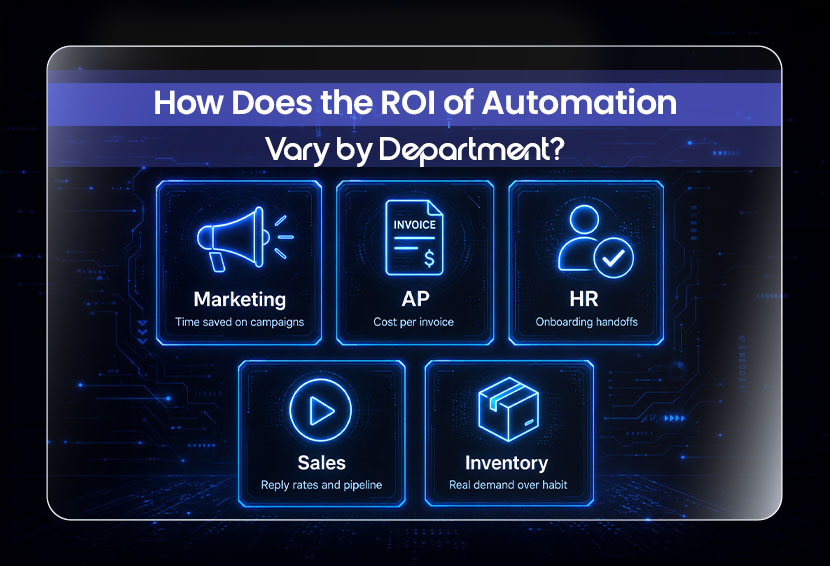
The formula above does not change. What changes is the size of the benefit and how fast it shows up. ROI shows up differently by department. Marketing saves time more than cost. AP is easiest to measure with a clear before-and-after cost. HR shows up in onboarding, where missed handoffs drive turnover. Sales moves reply rates and pipeline, and inventory earns its value by reacting to real demand.
1. ROI of Marketing Automation
Roi of marketing automation tends to come from time saved on repetitive campaign work rather than direct cost cuts. Email sequences, lead scoring, and audience segmentation free up hours every month for most marketing teams, and the highest returns come from automations that directly affect conversion, like lead scoring tied to follow-up timing. Nucleus Research found that marketing automation generated an average of $5.44 in benefits for every $1 invested over the first three years.
2. ROI of AP Automation
This is one of the most measurable categories because invoice processing has a clear before-and-after cost per invoice. NetSuite suggests that reducing invoice processing costs by 60% or more can be a reasonable goal when building a business case for AP automation. That number holds up well because it is based on a transaction count rather than a vague estimate of efficiency.
3. ROI of HR Automation
It shows up most clearly in onboarding. Manual onboarding involves account setup, document collection, training schedules, and a dozen small handoffs that often get missed. SHRM data shows that up to 20% of employee turnover happens within the first 45 days of work, and a poor onboarding experience is a direct driver of that early exit. Replacing employees is expensive because of hiring, training, and lost productivity. Automating onboarding can help reduce early turnover and save HR teams time and money.
4. ROI of Personalized Video Automation in Sales
It depends on what you are replacing. If a sales team is recording one-off videos manually for every prospect, automation that scales personalized video at volume can meaningfully improve response rates. Personalized video messages can increase reply rates by over 26% compared to plain text outreach. The ROI here is measured less in hours saved and more in pipeline movement, like demo bookings or reply rates.
5. ROI of Inventory Forecasting Automation
It earns its keep through reduced overstock and fewer stockouts. McKinsey reports that AI-driven supply-chain forecasting can reduce forecasting errors by 20–50% and warehousing costs by 5–10%, because the system reacts to real sales patterns instead of a manual reorder habit that is usually either too cautious or too late.
What Tools Are Best for Measuring Automation ROI?
You do not need expensive software to measure this. Most businesses fall into one of three approaches. Whichever method you pick, the goal is the same. You want a number you trust enough to make a decision with, not just a number that looks impressive in a slide deck.
1. Vendor-provided ROI calculators: They are the fastest starting point. Many automation platforms, especially in AP, marketing, and demo software, publish their own ROI calculators online. These are useful for a rough estimate, but treat the output as a starting range rather than a final answer, since the vendor has an obvious interest in the number looking good.
2. A simple spreadsheet: It is what most small and mid-sized businesses actually use, and it works fine. Track hours before automation, hours after, error rates before and after, and the monthly tool cost. This gives you full control over the assumptions instead of trusting someone else's formula.
3. Built-in platform analytics: It matters once automation is live. Many workflow tools report execution counts, time saved, and error rates directly inside the platform, which makes month-over-month tracking far less manual than starting from scratch each time.
What Factors Influence the Success of Automation ROI Projects?
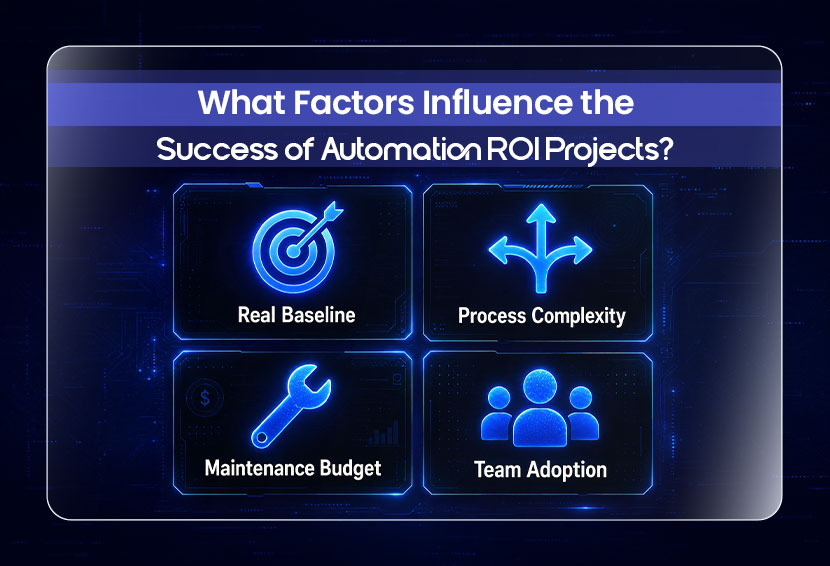
Some automation projects hit their projected ROI, and others fall short even with the right formula. A real baseline beats the formula since skipping it turns every number into a guess. Simple automations show ROI in a month; complex ones take three to eight, and that is normal. Budget for maintenance upfront, and remember the savings only count if the team stops doing the task manually.
1. A real baseline matters more than the formula: If you never measured how long the manual process actually took before automating it, every ROI calculation afterward is built on a guess.
2. Process complexity changes the timeline: A simple two or three-step automation can show ROI within a month or two. A complex process with branching logic and multiple systems can take three to eight months to break even, and that is normal, not a failure.
3. Maintenance gets underestimated almost every time: Automations break when an API changes, a login expires, or a connected app updates its layout. Budgeting time for this upfront keeps your ROI number honest instead of slowly eroding.
4. Team adoption decides whether the savings are real or theoretical: An automation that saves 15 hours a month only delivers that value if the team actually stops doing the task manually. Tools that sit unused next to the old manual process deliver zero ROI, no matter what the formula says on paper.
What Mistakes Make Automation ROI Calculations Wrong?
Most ROI mistakes come from skipping the baseline, counting soft benefits as hard savings, or ignoring maintenance costs. Vendor numbers reflect their best customer, not yours, and measuring too early skews the result. Give it a full quarter before trusting the number.
- Skipping the baseline: Without knowing the real cost of the manual process beforehand, any savings number afterward is a guess dressed up as data.
- Counting soft benefits as hard savings: Better customer experience or improved team morale are real, but they are not dollars. Mixing them into the same number as labor savings inflates the ROI in a way that will not hold up if anyone checks the math.
- Leaving out maintenance entirely: A tool that looked great in month one can quietly cost more in upkeep than it saves by month six, especially with more complex, multi-step automations.
- Trusting vendor demo numbers as your own: A vendor's case study reflects their best customer under ideal conditions. Your business has a different volume, different error rates, and a different team, so the number will not transfer directly.
- Measuring too early: Calculating ROI in week one almost always misses the setup cost and the learning curve. Give it at least one full month, ideally a full quarter, before trusting the number.
If you are not sure which process to start with, this list of processes worth automating first is a good place to check before you calculate ROI on the wrong thing.
How Can I Track ROI of Automation After Implementation?
Tracking the ROI of automation is not a one-time calculation. It is a habit that you have adopted. Start with a baseline before you automate anything. Document the current time, cost, and error rate for the task. Then track monthly: hours saved, errors prevented, tool cost, and maintenance hours spent fixing or adjusting the automation.
Every quarter, compare actual results against what you projected. If the real number is lower than expected, figure out why before assuming the automation failed. It might just need a small adjustment. If the real number is higher, that process is a strong candidate for the next thing you automate.
This is also the simplest way to catch an automation that has quietly stopped delivering value, which happens more often than people expect once a process changes and nobody updates the workflow to match.
Conclusion
The ROI of automation is not something you should have to guess at. The formula is simple; the example above takes ten minutes to redo with your own numbers, and the mistakes that ruin most calculations are avoidable once you know what to look for.
The hardest part is rarely the math. It is figuring out which process to automate first. A structured process audit shows you exactly where manual work is costing you the most, so you can calculate ROI on the process that will actually move the needle.
FAQs
Q: Can automation ROI vary across industries?
Yes, significantly. A manufacturing business sees ROI mostly through error reduction and machine uptime, while a service business sees it through hours saved on client-facing work. The formula stays the same, but the size and speed of the return depend heavily on how repetitive and high-volume the underlying process is.
Q: What is the ROI of business process automation?
Published automation benchmarks vary significantly by workflow complexity, with simple automations generally showing shorter payback periods than complex or RPA-based projects. Results vary widely depending on process complexity and how well the baseline was measured before automating.
Q: How to track the ROI of operational automations?
Track it monthly using four numbers: hours saved, errors prevented, tool cost, and maintenance hours. Review the totals every quarter against your original projection and adjust your expectations or your process as needed.
Q: What factors influence the success of automation ROI projects?
The biggest factors are having an accurate baseline before automating, realistic expectations for process complexity, a maintenance budget that is not zero, and a team that actually adopts the new workflow instead of running it alongside the old manual process.
Weekly Newsletter
Scale Without Operational Chaos
Get weekly actionable insights and AI updates to improve operations and grow with better systems.
2,400+ operators subscribed
Unsubscribe anytime