

It's midnight. You're copying order details from Shopify into a spreadsheet, drafting a shipping update email, and trying to remember if you already restocked that SKU that keeps selling out. You started this business to build something. Not to do data entry at midnight.
The tasks are not the problem. The process is. Every single thing you're doing by hand right now has an automated workflow version that runs on its own, around the clock. These five workflows are strong starting points for e-commerce businesses looking to scale without adding unnecessary manual work.
What Is an Automation Workflow and Why Does It Matter for E-commerce?
An automation workflow is a simple rule. When X happens, do Y. One trigger, one or more actions, no manual step in between. For instance, a customer places an order, and your inventory count updates, then a shipping label gets generated. The customer receives a tracking email, and all of that happens in seconds, without anyone on your team touching it.
E-commerce is one of the best environments for digital workflow automation because the work is high-volume, repetitive, and rule-based. The same actions repeat thousands of times, and that's exactly what automation handles well.
Also Read: What is Business Process Automation: A Complete Beginner’s Guide
What Are the Latest Trends in E-commerce Automation?
The shift is not about automating individual tasks anymore. It is about connecting them. Agentic AI is moving into inventory, support, and returns. Real-time sync across Shopify, Amazon, and third-party logistics is becoming standard. Retailers are increasingly using AI-powered automation across customer support, marketing, inventory management, and operational decision-making.
Here is a breakdown:
- Agentic AI, systems that make decisions and not just execute commands, is moving into inventory management, customer support, and return processing.
- Real-time and near-real-time data synchronization across commerce platforms, marketplaces, and logistics systems is becoming increasingly important for growing e-commerce operations.
- About 80% of retail executives expect their companies to adopt AI-powered automation by the end of 2025.
Also Read: How AI is Transforming Business Operations.
Workflow 1: Order Fulfillment and Automated Workflow Software
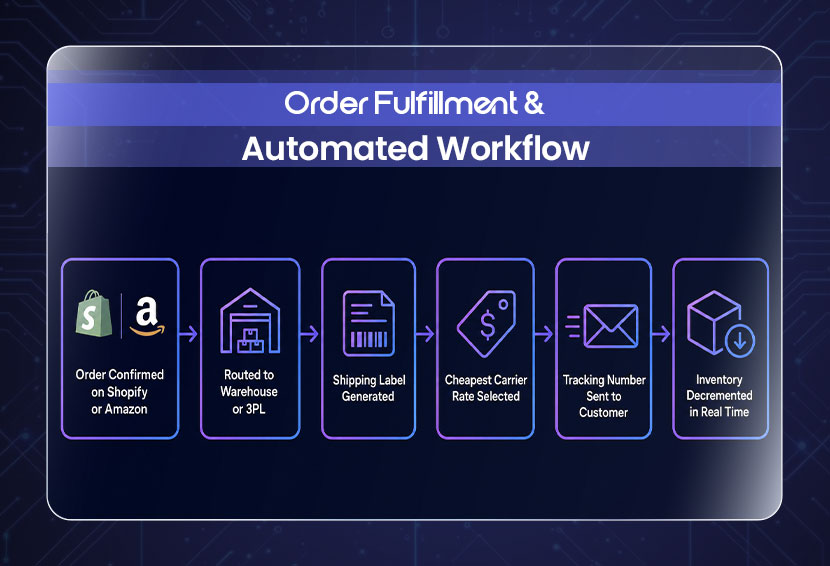
Without automation, someone on your team copies the shipping address, logs into a carrier portal, generates a label, emails the customer an update, and manually updates inventory. Multiply that by 100 orders a day, and you have a full-time job that contributes zero to growth.
Here is how automated order fulfillment runs:
- The order is automatically routed to your warehouse or 3PL.
- A shipping label is generated without anyone touching it.
- The system pulls the cheapest available carrier rate.
- The customer receives their tracking number instantly.
- Inventory is decremented in real time across your store.
Workflow 2: Customer Support as a Full Digital Workflow Automation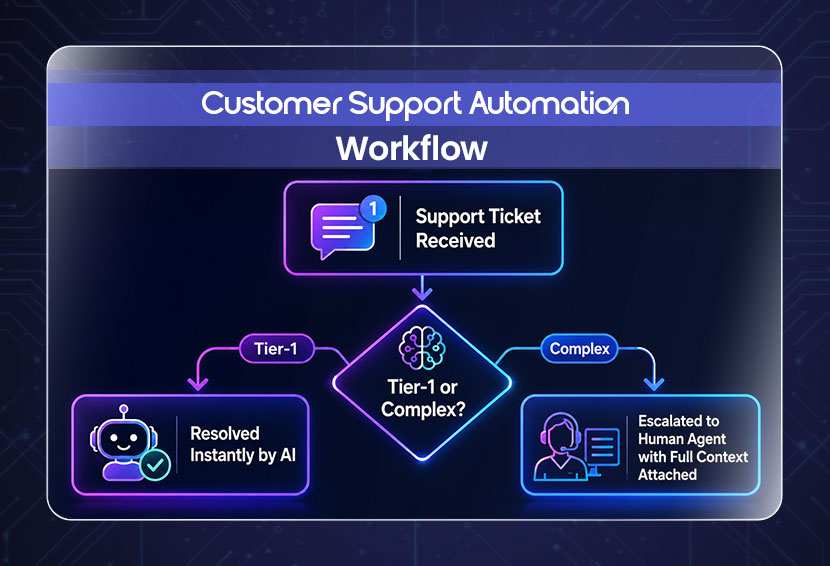
AI customer support is not a chatbot answering "where is my order?" A ticket comes in, AI reads and categorizes it, and either resolves it or hands it off. A chatbot interaction costs about $0.50 while a human agent costs $6.00. Companies combining self-service with AI cut their cost per interaction by 53%.
Here is how automated customer support runs:
- A support ticket comes in, and AI reads and categorizes it.
- Tier-1 queries like order status, return eligibility, and basic FAQs get resolved on the spot.
- Anything that needs a human gets escalated with full context already attached.
Workflow 3: Abandoned Cart and Post-Purchase Sequences
Roughly 7 out of 10 shoppers who add items to their cart leave without buying. Baymard Institute's analysis of 50 studies puts the average cart abandonment rate at 70.22%. Most stores treat this as a conversion problem. It is really a follow-up problem.
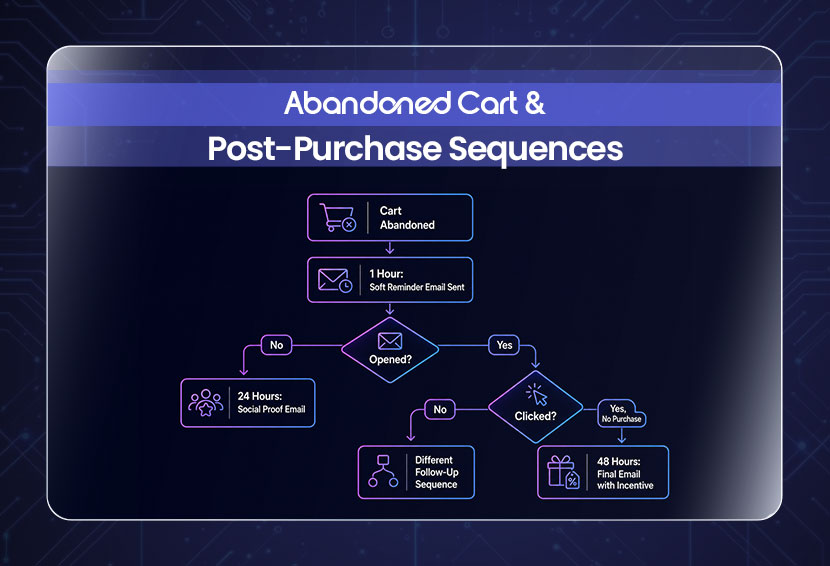
Here is how automated cart recovery runs:
- At 1 hour, a soft reminder goes out while the cart is still fresh.
- At 24 hours, a second message with a review or social proof.
- At 48 hours, a final touchpoint, sometimes with a small incentive.
- If someone opens but does not click, the sequence adjusts.
- If someone clicks but does not buy, they get a different follow-up entirely.
If you want to see what that looks like when it's built properly, SPCTEK.AI's automation workflows page has the details.
Workflow 4: Document Workflow Automation for Returns
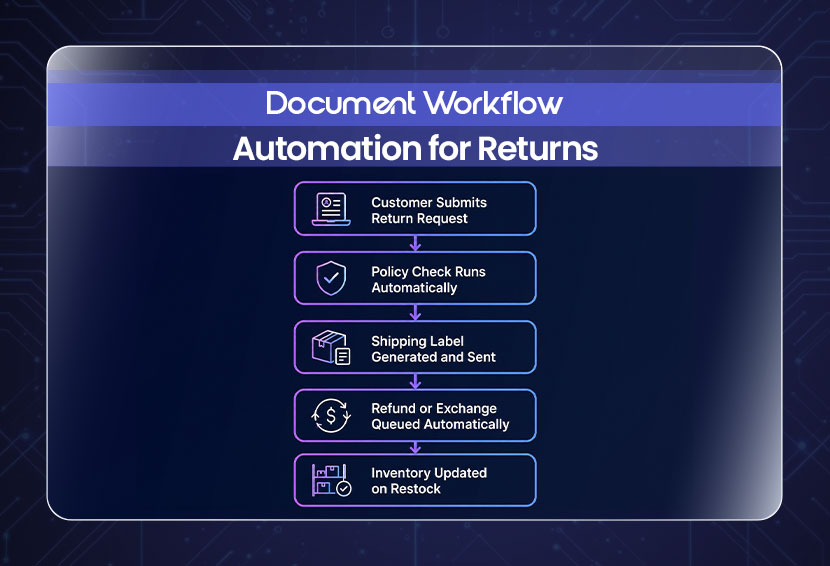
Reverse logistics costs can reach 66% of the item's original price once you factor in labor, storage, repackaging, and reshipping. An unautomated return sits in a queue across four departments, all waiting on each other before anything moves.
Here is how automated returns run:
- Customer submits a return request.
- The policy check runs automatically.
- A shipping label is generated and sent to the customer.
- A refund or exchange gets queued without anyone approving it manually.
- Inventory updates the moment the item is restocked.
Workflow 5: Inventory and Reorder Workflow Automation
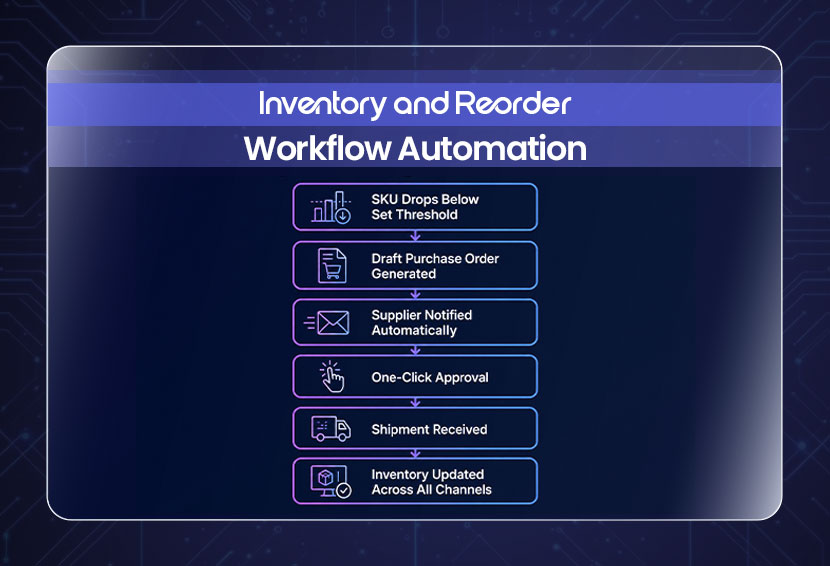
Inventory distortion costs retailers globally on a massive scale. IHL Group has estimated the impact at approximately $1.77 trillion, driven by factors including supplier issues, inventory inaccuracies, internal process failures, theft, and forecasting problems.
Here is how automated inventory restocking runs:
- A SKU drops below your set threshold.
- A draft purchase order is generated automatically.
- Your supplier gets notified.
- You approve with one click.
- Inventory updates across every channel the moment the shipment is received.
How to Identify the Best E-commerce Automation Workflow to Start With?
Not every store needs all five workflows at once. Start with the process creating the most manual work, delays, or errors. If fulfillment is becoming difficult to manage, support tickets are piling up, or abandoned carts are going unfollowed, those are strong signs that automation could help. A business process audit can show where automation is likely to create the greatest operational impact. And guess what? You don't have to guess because a structured business process audit shows exactly where manual work is costing you the most in time, errors, or both.
- If order volume is high and fulfillment is chaotic, start
- If support tickets are piling up and response times are slipping.
- If carts are abandoned with no recovery.
Also Read: Top 10 Business Processes You Should Automate First
What Are the Top Tools for Automating E-commerce Operations and Where Do They Fall Short?
Zapier, Klaviyo, Gorgias, and ShipStation are the tools that come up in every conversation about e-commerce automation. Each platform specializes in a different part of the e-commerce stack. The challenge is ensuring data and actions move reliably between them as workflows become more complex. You end up with five dashboards and five places where something can break, with nobody watching all of them at once. Using tools to automate sales workflow at a surface level is straightforward. But a system where your order data informs your support workflow, connects to your inventory, and feeds your marketing sequences requires custom-built automation.
Here is a breakdown of the popular automation tools:
- Zapier: Strong for connecting apps and building multi-step automations, although complex operational systems may require careful architecture, monitoring, and custom logic.
- Klaviyo: Excellent for customer-data-driven marketing automation, but it is not designed to serve as a complete warehouse or order-management system.
- Gorgias: Strong for e-commerce customer support and order-related service automation, but broader cross-department workflows may require additional integrations.
- ShipStation: Strong for shipping and fulfillment automation, while broader marketing and customer-lifecycle workflows usually depend on integrations with other systems.
Also Read: How can automation reduce business operational costs
Grab the AI Playbook to understand how these systems are structured before you build anything.
Conclusion
Most e-commerce businesses have automated something. Maybe shipping notifications, maybe a welcome email sequence. But the manual work is still there, just in different places, and the gaps between what runs automatically and what still needs a human keep adding up every single day.
The stores pulling ahead are not the ones with the biggest budgets or the most tools. They picked one workflow that was costing them the most, automated it, measured what changed, and moved to the next one. That compounding effect is where the real operational shift comes from. If you’re looking for ready-to-use business and e-commerce automation workflows, our workflows are built to automate real operations with optimum security and error management. 
FAQs
Q: Which e-commerce automation software is most user-friendly?
A: Tools like Zapier or Klaviyo are easy to start with, but they hit ceilings fast. They need manual setup, regular maintenance, and don't connect across departments without extra work. The most useful setup for a growing store is one built around your workflows, not the other way around.
Q: How can I automate my Amazon store effectively?
A: Start with order routing and fulfillment since Amazon's seller metrics are tied directly to shipping speed and accuracy. Then set inventory thresholds to prevent stockouts that hurt your ranking. Layer in a support workflow to handle buyer messages within Amazon's response window.
Q: What is the difference between a marketing automation workflow and a regular email campaign?
A: A campaign is a message you send on a schedule. A marketing automation workflow fires based on what a customer does or doesn't do. One is broadcast-based, while the other responds to customer behavior, allowing messages to be more timely and relevant.
Q: Do I need a developer to set up automation workflows for my store?
A: For basic two-app connections, no. For workflows that span multiple platforms and handle branching logic across fulfillment, support, and inventory, yes. That's the gap SPCTEK AI fills.
Q: How long does it take to see results from e-commerce automation?
A: Operational automations such as fulfillment and support can begin producing measurable improvements soon after successful deployment, while the time required to demonstrate ROI depends on workflow volume and the metrics being tracked. Fewer manual hours, faster response times, fewer errors. Marketing and inventory workflows take longer as the system learns your patterns.
Weekly Newsletter
Scale Without Operational Chaos
Get weekly actionable insights and AI updates to improve operations and grow with better systems.
2,400+ operators subscribed
Unsubscribe anytime