

If you run a small business, you have probably already tried some form of automation for small business operations, even if you didn't call it that. Maybe it's an email that sends itself when someone fills out a form, or a reminder that goes out when an invoice is overdue. The real question most owners get stuck on isn't whether to automate. It's where to start, and what it's actually going to cost once you move past the free trial.
Small business automation has moved from a competitive advantage to something more owners are actively exploring as tools become easier and cheaper to adopt. 58% of small businesses now say they use generative AI, up from 40% in 2024 and more than double the 23% who used it in 2023, according to the U.S. Chamber of Commerce's 2025 report. That's a fast jump, and it means the businesses still running everything manually are increasingly the exception, not the rule. This guide walks through both halves of that decision: where a small business should actually start, and what each stage of automation for small businesses realistically costs, from free tools to a fully custom build.
What Are the Biggest Small Business Automation Pain Points?
Most small business automation pain points come down to the same patterns: the owner becomes the bottleneck, manual data entry quietly drains money, work slips through the cracks between handoffs, and hiring covers repetitive volume instead of work that actually needs a person.
- You're the one holding everything together: If a decision, an approval, or a task waits on you personally, the business runs at your speed, not its own. It's a structural problem, and it's one of the clearest signs it's time to transition to an automated business.
- Manual data entry is quietly expensive: A 2025 survey found that manual data entry costs U.S. businesses an average of $28,500 per employee every year. That number doesn't show up as one line item. It's spread across hours spent typing, correcting mistakes, and chasing down information that should already be in one place.
- Things fall through the cracks between handoffs: A lead sits in an inbox for two days. A payment comes in, and nobody updates the job status. These aren't people problems; they're process problems, and they tend to get worse as the business grows, not better.
- You're hiring to cover volume, not value: If your first instinct every time the business grows is to add headcount for tasks that follow the same steps every time, you're likely paying people to do work a system could handle instead.
Where Should a Small Business Start with Automation?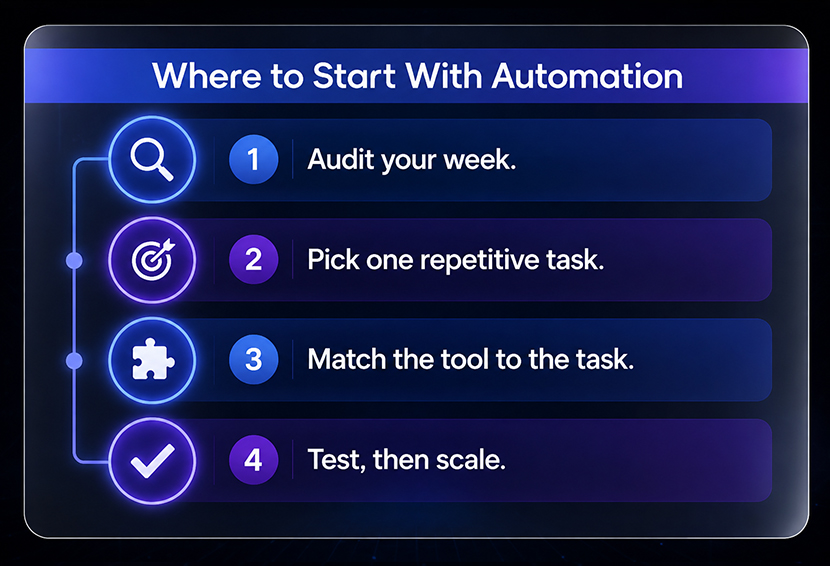
Once you know where the friction is, the next step is picking the right starting point, not the biggest one. Here's the order that tends to work. Start by auditing what your team actually does each week. Automate the most repetitive, judgment-free task first, such as invoicing or reminders. Pick the tool to fit that task, test it standalone, then use the time it saves to fund and justify the next automation.
- Start with a real audit, not a guess: Before spending anything, write down what your team actually does every week, how long each task takes, and how often it goes wrong. This is the same process outlined in How to run a business audit in one afternoon; it takes a few focused hours, not a week off work.
- Pick the task that's high-volume and low-complexity: The best first automation is something that happens often, follows the same steps every time, and doesn't require judgment calls. Invoicing, appointment reminders, and lead routing are usually easier and safer starting points than anything involving exceptions or human decision-making. A closer breakdown of which tasks tend to pay off fastest is in the top 10 business processes you should automate first.
- Match the tool to the task, not the other way around: Don't buy a platform and then look for something to automate with it. Decide what needs fixing first, then find the smallest tool that solves that one thing.
- Test before you scale: Run the new automation on one process for a few weeks. Confirm it actually works the way you expect before connecting it to anything else. This is also the point where you should ask yourself if you want to build it in-house or hand it to someone else. This question is covered in more depth in hiring an AI automation agency, including what to ask before signing anything.
- Let the first win fund the next one: Once one process is running cleanly and saving real time, use that saved time or money to justify automating the next one. This compounding approach is what separates businesses that get stuck after one automation from ones that keep building.
What Are the Best Automation Tools for Small Businesses?
Zapier and Make are two of the most common no-code automation platforms for small businesses. Zapier's free plan provides 100 tasks per month, while Make offers a higher operation limit on its free tier. Some QuickBooks customers report saving 12 hours a month. HubSpot blends CRM with automation, free for basics, paid from $9–15/seat.
1. No-code connector tools: These are the most common starting point for small business automation tools. Zapier connects thousands of apps and lets you build automated workflows without writing code. Its free plan includes 100 tasks per month with unlimited two-step Zap workflows, Tables, and Forms, while the paid Professional plan starts at $19.99 a month and unlocks multi-step workflows and unlimited premium apps. Make (formerly Integromat) works similarly and tends to run cheaper for the same volume of automations; its free plan includes 1,000 operations a month, with paid plans starting around $12 a month for 10,000 operations. Both are good fits if your automations are mostly "when this happens in one app, do that in another."
2. AI-driven finance and bookkeeping tools: It’s where a lot of small businesses see the fastest return. QuickBooks, for instance, now runs AI in the background to categorize transactions, reconcile accounts, and match payments automatically. Customers using its AI-powered bank feed save an average of 12 hours a month on bookkeeping tasks, which is real time back in an owner's week without touching a single spreadsheet.
3.Marketing and CRM platforms: These include platforms like HubSpot combine automation with lead tracking. HubSpot's Marketing Hub free tools include basic CRM, email marketing, and one email automation at no cost. The paid Starter tier starts at around $9 to $15 per seat per month if you need to remove branding and unlock simple workflows. Starter pricing can also vary by HubSpot product, seats, and billing terms. Full marketing automation with multi-step workflows and lead scoring lives in the Professional tier, which is a meaningfully bigger jump in both price and capability.
Choosing between them comes down to what you're automating. If you're connecting apps that don't talk to each other, start with Zapier or Make. If the bottleneck is finance, start inside a tool like QuickBooks that already has AI built in. If it's marketing follow-up, a CRM with automation built in will do more than a generic connector tool ever will.
What Does Small Business Automation Cost?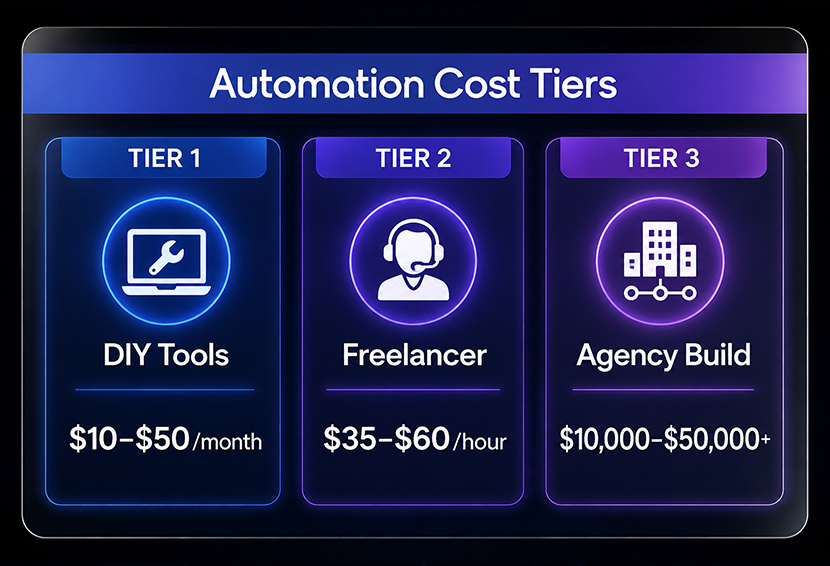
This is the part most guides skip past. Costs for automation for small business fall into three real tiers, and which one makes sense depends on how complex the task is and how much time you have to build it yourself.
Tier 1 : DIY with off-the-shelf tools
This is the cheapest way in, and often the right starting point. Free tiers of Zapier, Make, and QuickBooks cover very light usage. Once you outgrow the free plan, most paid tiers for a single workflow land somewhere between $10 and $50 a month. The tradeoff is your own time. Building and testing even a moderately complex workflow can take real hours if you're learning the tool as you go, and you're the one responsible for fixing it when something breaks.
Tier 2 : Hiring a freelancer
If you'd rather have someone build it for you without a full agency engagement, freelance automation help is widely available. Hiring an AI automation engineer on Upwork generally costs $35 to $60 an hour, and a custom automation solution for something like accounting or supply chain workflows typically starts around $6,000. This tier works well for a single, well-defined project, but quality varies a lot from freelancer to freelancer, and ongoing maintenance usually isn't included unless you negotiate it upfront.
Tier 3 : A managed build or agency
For more complex automation involving several connected systems, custom logic, and ongoing support, project-based pricing takes over. Clutch's 2026 pricing data shows AI automation projects commonly ranging from $10,000 to $49,999. This tier makes the most sense once you've already proven a smaller automation works and you're ready to connect it across your whole operation.
Marketing automation deserves separate consideration because pricing changes significantly depending on how advanced the workflows become. HubSpot's Starter tier costs $9 to $15 a month per seat, but real workflow automation, lead scoring, and behavior-triggered emails only unlock at the Professional tier, which runs closer to $800 a month on an annual plan. That gap between "basic email tool" and "actual marketing automation" catches a lot of small business owners off guard when they're comparing sticker prices.
The honest rule across every tier: most small businesses should not jump straight to a $10,000+ custom build. Start at the tier that matches your current process complexity, and prove it saves time or money.
How Does Workflow Automation Pay Off for Small Companies?
Cost only tells half the story. Workflow automation for small businesses pays for itself through three main channels: time saved, errors avoided, and speed gained, and it's worth running the numbers before you commit to a tool, not after.
1. Time saved is the easiest to measure: Take the hours your team spends on a manual task each week and multiply it by their hourly cost. If a task takes 10 hours a month and the person doing it costs $30 an hour, that's $300 a month in labor tied up in one repetitive process. If automation cuts that time by 80%, you've recovered $240 a month before accounting for the tool's cost.
2. Errors are more expensive than they look: IBM's 2025 research found that more than one-quarter of organizations estimate they lose over $5 million annually because of data-quality problems. On a small business scale, that translates to duplicate entries, missed follow-ups, and billing mistakes that eat up hours to clean up after the fact.
3. Speed compounds: A faster invoice cycle means faster cash flow. A faster lead response means a better chance of closing the deal. Businesses that respond to leads within an hour are seven times more likely to qualify them, according to research published by Harvard Business Review, compared to waiting even a little longer.
4. Return on investment varies by how the automation was measured before it went live: Deloitte's intelligent automation research found that organizations beyond the pilot stage reported average cost reductions of about 32%. That kind of number only holds up if you tracked the real cost of the manual process first. Without a baseline, any "savings" claim afterward is a guess dressed up as data, a point worth sitting with before trusting a vendor's promised numbers, and one covered in more depth in how to calculate the ROI of automation.
Conclusion
Small business automation doesn't have to start big, and it definitely shouldn't start expensive. The businesses that get real value out of it follow the same pattern: they audit what's actually happening, pick the one process costing them the most time or money, and automate that first. Whether that first step costs nothing because you built it yourself in Zapier, or a few thousand dollars because you brought in a freelancer, the starting point matters less than the discipline behind it.
What separates the businesses that keep going from the ones that stall after one automation is simple: they use what the first fix saves, in time or in money, to fund the next one. Fix the highest-friction task first, prove it works, and grow from there.
FAQs
Q: How do I choose the right automation software for my small business?
Match the tool to the specific task you're automating, not the other way around. If you're connecting different apps, a no-code connector like Zapier or Make is usually enough. If the bottleneck is finance, a tool with built-in automation, like QuickBooks, will get you further than a generic workflow builder. Start with the free tier of whichever tool fits, and only upgrade once you've confirmed it actually solves the problem.
Q: How does AI help small businesses automate tasks?
AI adds judgement to automation that basic rule-based tools can't handle on their own. Instead of just moving data from one place to another, AI tools can read documents, categorize transactions, flag unusual activity, and draft responses. QuickBooks customers using its AI-powered bank feed save an average of 12 hours a month on bookkeeping, which is a good example of AI handling judgement calls, like flagging a transaction that looks off, that older rule-based automation would have missed.
Q: What does marketing automation setup cost for a small business?
Basic email tools with light automation start at $9 to $15 per seat per month on platforms like HubSpot. Real marketing automation, including multi-step workflows and lead scoring, typically requires a Professional-tier plan, which runs closer to $800 a month on an annual contract, plus a one-time onboarding fee in some cases. The jump between the two tiers is bigger than most owners expect, so it's worth confirming exactly which features you need before committing to a plan.
Q: How can small businesses reduce finance overhead with automation?
Automating recurring invoices, payment reminders, and bank reconciliation removes most of the manual work finance teams repeat every month. Tools like QuickBooks handle transaction categorization and reconciliation automatically, and automated invoicing gets businesses paid up to 4 times faster than paper-based billing. For businesses that outsource bookkeeping, automation also reduces the billable hours needed for manual data entry, which lowers the overall cost of outside financial support.
Q: What are some cost-effective AI solutions for small businesses?
The most cost-effective starting points are usually the free or low-cost tiers of tools you may already use. Zapier's free plan covers 100 tasks a month, Make's free plan covers 1,000 operations, and QuickBooks includes AI-powered bookkeeping features inside its standard subscription. These cost nothing extra to try and are often enough to automate a single high-friction task before any bigger investment is worth considering.
Weekly Newsletter
Scale Without Operational Chaos
Get weekly actionable insights and AI updates to improve operations and grow with better systems.
2,400+ operators subscribed
Unsubscribe anytime